Appearance
Alerting
Path: /settings/alerting
Set notification destinations and rules.
A rule fires when an attribution report meets your severity and confidence thresholds.
An admin can change this page.
Other roles see View only.
Do this after you add Configurations. See the 15-minute quickstart.
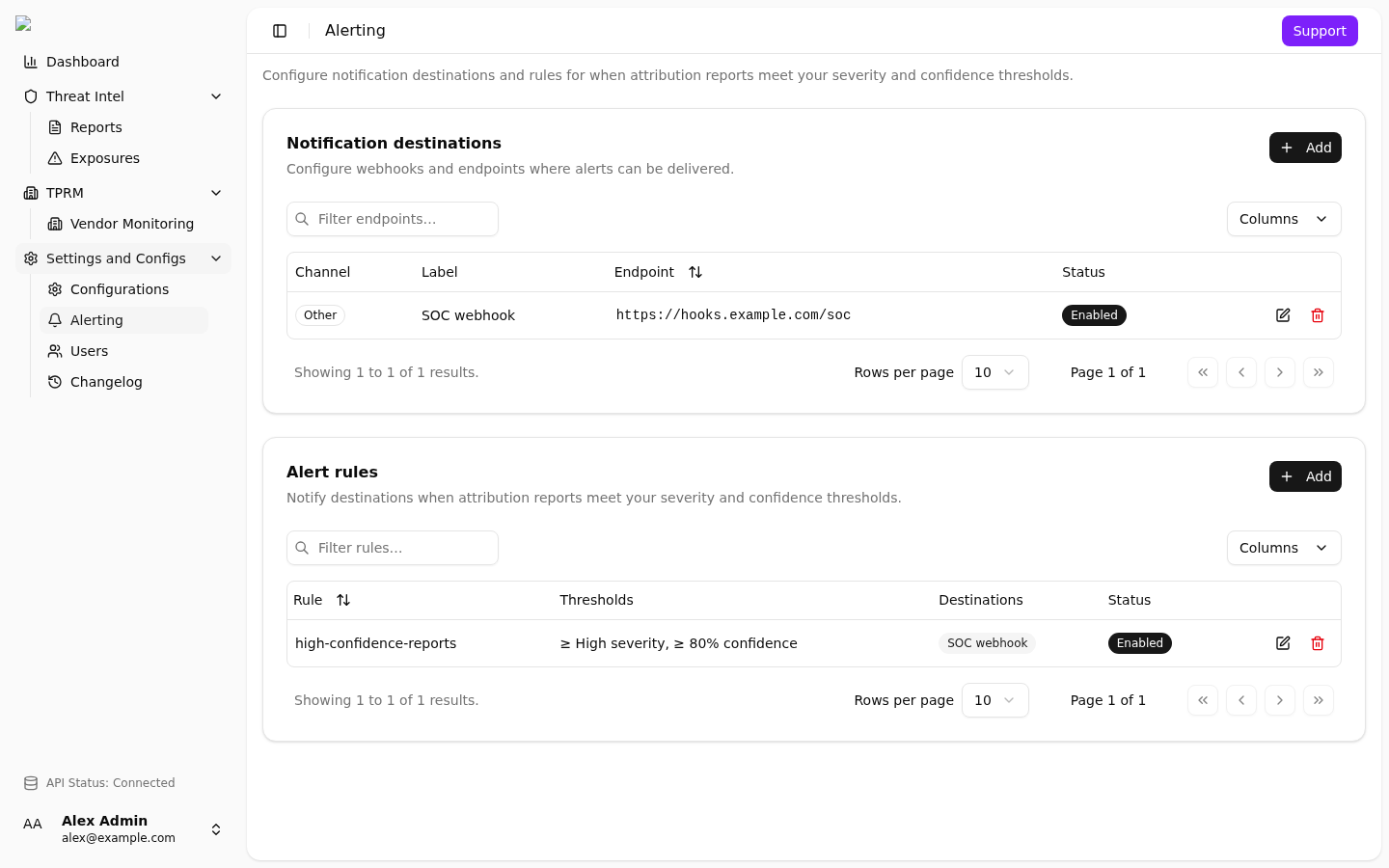
Notification destinations first, then Alert rules. Type, endpoint, enabled, thresholds.
Add a destination
- Open
/settings/alerting. - Under Notification destinations, select Add.
- Select Type.
- Enter Label if you need a name. Label is required when type is Other.
- Enter Endpoint. The URL must start with
http://orhttps://. - Leave Enabled on, or turn it off to save without delivery.
- Select Save.
Destinations
Add a destination first.
| Field | Meaning |
|---|---|
| Type | Discord, Microsoft Teams, Google Chat, SIEM, CTI, or Other |
| Label | Optional. Required when type is Other |
| Endpoint | URL that starts with http:// or https:// |
| Enabled | Turn the destination on or off |
Leave secrets out of the label.
Paste the webhook URL that the destination gives you.
If you remove a destination, update each rule that used that destination.
Add a rule
- Add at least one enabled destination.
- Under Alert rules, select Add.
- Enter Name. Name is required.
- Select at least one destination.
- Set Minimum severity. Default is High.
- Set Minimum confidence. Default is 80%.
- Leave Enabled on.
- Select Save.
If you have no destinations, add one before you add a rule.
Rules
Each rule needs:
| Field | Meaning |
|---|---|
| Name | Required |
| Enabled | Turn the rule on or off |
| Destinations | At least one enabled destination |
| Minimum severity | Low, Medium, High, or Critical |
| Minimum confidence | 50% to 100% |
Default values for a new rule are High severity and 80% confidence.
A report must meet both thresholds before the rule sends a notification.
The payload omits the secret value.
Webhook body
Destinations other than Discord receive JSON:
json
{
  "event_type": "attribution_report_alert",
  "rule_name": "high-confidence-reports",
  "severity_label": "High",
  "severity_numeric": 3,
  "confidence": 80,
  "title": "Example report title",
  "repo_link": "https://example.com/repo",
  "report_id": 123,
  "timestamp": "2026-08-25T16:00:00+00:00"
}
Discord destinations receive an embed with the same facts.
The product sends one POST. HTTP status below 400 is success.
Type is a label on a webhook URL: Discord, Microsoft Teams, Google Chat, SIEM, CTI, or Other.
If delivery fails, see Troubleshooting.
Suggested first rule
- Add one destination that your team already reads.
- Add a rule named
high-confidence-reports. - Set minimum severity to High.
- Set minimum confidence to 80%.
- Enable the rule.